
Quick Answer: A voice to voice translator listens to what you say in one language and plays it back translated into another — in real time, as spoken audio. The best apps in 2026 go further: they clone your voice so the translated output sounds like you, not a robot. For iOS users, Owll Translator is the top pick. For free cross-platform use, Google Translate covers most cases.
Real-time voice to voice translation in 100+ languages, with AI Voice Cloning — translated replies sound like you, not a robot. Free to download on iPhone and Mac.Try Free → Try Free → Try Free →
What Is a Voice to Voice Translator?
A voice to voice translator is a tool that takes spoken input in one language and delivers spoken output in another — automatically, without you typing a single word. You speak; it listens, translates, and talks back.
The practical applications are wide:
- Traveling abroad — ask for directions, order food, or negotiate at markets in any language
- Business meetings — follow a multilingual discussion in real time without a human interpreter
- Medical appointments — communicate clearly with a doctor or pharmacist who speaks a different language
- Family conversations — bridge language gaps with relatives who speak different native tongues
- Customer calls — support customers or suppliers in their native language without hiring multilingual staff
In 2026, the technology has matured to the point where the best voice to voice translators handle common language pairs with near-human accuracy and — in a few leading apps — produce output that sounds like the original speaker’s voice, not a generic robot.
How Voice to Voice Translation Works
Every voice to voice translator follows the same three-stage pipeline:
- Speech Recognition (ASR). Your spoken words are captured by the microphone and converted into a text transcript using an automatic speech recognition model. The accuracy of this step sets the ceiling for everything that follows — if ASR mishears a word, the translation will inherit that error.
- Machine Translation (MT). The transcript is passed to a translation model that converts it from the source language to the target language. Modern apps use large language models rather than older rule-based systems, which means they handle idioms, context, and domain-specific vocabulary much better than tools from even three years ago.
- Text-to-Speech (TTS) or Voice Cloning. The translated text is converted back into spoken audio. Basic tools use a generic synthetic voice. Advanced tools — like Owll Translator — use AI voice cloning to replicate your own vocal characteristics, so the translated reply sounds natural and personal rather than mechanical.
The entire pipeline typically completes in 1–5 seconds for short utterances. Latency increases with sentence length, background noise, and unusual accents. For live conversation use, the key metric is not just accuracy but responsiveness — a half-second delay feels like a pause; a three-second delay breaks the conversational flow.
The 5 Best Voice to Voice Translator Apps in 2026
| App | Best For | Languages | Voice Cloning | Price | Platform |
|---|---|---|---|---|---|
| Owll Translator ⭐ | AI voice cloning, meetings, travel | 100+ | ✅ Yes | Free + premium | iOS / Mac |
| Google Translate | Free everyday use | 133 | ❌ No | Free | iOS / Android / Web |
| Microsoft Translator | Microsoft 365 & multi-speaker | 100+ | ❌ No | Free / Enterprise | iOS / Android / Web |
| Apple Translate | On-device privacy (iPhone) | 20 | ❌ No | Free (built-in) | iOS / Mac |
| iTranslate | Travel & offline use | 100+ | ❌ No | Freemium | iOS / Android |
1. Owll Translator — Best for AI Voice Cloning
Owll Translator is the only consumer app in 2026 that combines real-time voice-to-voice translation with AI Voice Cloning — meaning the translated audio uses your own voice characteristics rather than a generic synthetic speaker. This matters most in contexts where authenticity counts: business calls, medical conversations, and family communication.
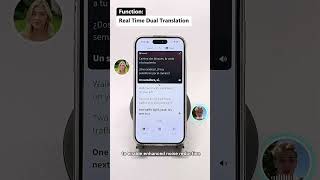
Key strengths:
- ✅ True AI Voice Cloning — translated output preserves your tone and vocal identity
- ✅ 100+ languages including regional dialects like Mexican Spanish and Canadian French
- ✅ Meeting Translation — handles multi-speaker conversations with Smart Minutes (summaries up to 10,000 words)
- ✅ Private Listening (Earphone) mode — discreet real-time translation through your earphones
- ✅ 5-second conference interpretation — ultra-low latency designed for fast-paced live discussions
- ✅ Industry-specific accuracy — built-in vocabulary for medical, legal, and religious topics
- ✅ Rated ⭐ 4.7/5 on the App Store (1.4K reviews)
Limitations: iOS and Mac (M1+) only — Android users cannot access it via the Play Store. Premium features require a subscription.
Try Free → Try Free → Try Free →
2. Google Translate — Best Free Option
Google Translate remains the most accessible voice to voice translator for most people. Its Conversation mode listens to two speakers alternately and translates both sides of the exchange in real time. It supports 133 languages, runs on iOS and Android, and costs nothing.
Key strengths:
- ✅ Completely free — no account required for basic use
- ✅ 133 languages with Conversation mode
- ✅ Offline language packs for travel without internet
- ✅ Available on iOS, Android, and web
Limitations: Generic synthetic voice output (no voice cloning). Less accurate than specialized AI tools for technical or domain-specific content. No meeting summary or Smart Minutes feature.
3. Microsoft Translator — Best for Group Conversations
Microsoft Translator’s multi-participant Conversation mode lets up to 100 people in different locations join a shared translation session via a code — each person sees (or hears) translations in their own language in real time. It integrates natively with Microsoft Teams, Word, and Outlook.
Key strengths:
- ✅ Multi-speaker group sessions with up to 100 participants
- ✅ Native Microsoft 365 integration
- ✅ Real-time on-device translation for select language pairs
Limitations: No voice cloning. Less accurate than DeepL or Owll for nuanced European language pairs. The standalone app has fewer features than the Teams-integrated version.
🎙️ Want translated audio that sounds like you?
Only Owll Translator offers AI Voice Cloning — your translated words, in your own voice. Free to start on iPhone.
4. Apple Translate — Best for On-Device Privacy
Apple’s built-in Translate app offers on-device processing for its supported language pairs, meaning no audio leaves your phone. With iOS 26, Live Translation is integrated directly into Phone calls, FaceTime, and Messages — without opening a separate app. As of mid-2026, the standalone Translate app supports 20 languages.
Key strengths:
- ✅ Fully on-device for supported languages — maximum privacy
- ✅ No app to download — built into every iPhone and Mac
- ✅ Live Translation in Phone/FaceTime/Messages via iOS 26
Limitations: 20 languages only — far fewer than Google (133) or Owll (100+). No voice cloning. No meeting summary. Android users cannot access it.
5. iTranslate — Best for Offline Travel
iTranslate is a veteran translation app with a strong offline mode and 100+ language support. Its Converse mode handles back-and-forth voice conversations. It works well when you need reliable voice translation without guaranteed internet access — hiking in rural areas, on cruise ships, or in countries with expensive data roaming.
Key strengths:
- ✅ Robust offline mode with downloadable language packs
- ✅ Converse mode for live voice-to-voice conversations
- ✅ Available on iOS and Android
Limitations: Freemium model — most useful features require a paid subscription. No voice cloning or meeting summaries. Translation quality lags behind AI-first tools for complex content.
Voice to Voice Translator: Which One Should You Use?
- Need AI voice cloning + meetings + travel in one iOS app? → Owll Translator
- Want completely free, cross-platform (iOS + Android)? → Google Translate
- Running a multilingual group meeting in Microsoft 365? → Microsoft Translator
- Privacy-first, built-in, no app needed on iPhone? → Apple Translate
- Traveling with unreliable internet? → iTranslate (offline packs)
What Makes AI Voice Cloning Different
Standard voice to voice translators use a generic text-to-speech (TTS) voice for the output — everyone using the app sounds the same. AI Voice Cloning changes this fundamentally: the app analyzes your unique vocal characteristics and synthesizes translated output in your own voice, preserving your tone, cadence, and identity.
This matters in three specific situations:
- Business negotiations — your counterpart hears you, not a robot, which builds rapport and trust more effectively.
- Medical consultations — a doctor who hears a natural, human voice is more likely to engage attentively than with mechanical TTS output.
- Personal relationships — family members or close friends communicate with warmth and emotional nuance, not synthetic flatness.
Among consumer apps in 2026, Owll Translator is the only tool that brings AI Voice Cloning into a live voice-to-voice translation workflow — rather than limiting it to post-production dubbing or studio use cases.
Accuracy: What to Expect From Voice to Voice Translation in 2026
Accuracy depends on three variables: the language pair, the audio quality, and the domain of the content.
- High-resource pairs (English ↔ Spanish, French, German, Mandarin, Japanese): Output is usable for business and personal contexts with minimal editing. Most apps perform well here.
- Mid-resource pairs (Vietnamese, Polish, Turkish, Hindi): Good enough for general conversation; riskier for legal, medical, or financial content.
- Low-resource pairs (Swahili, Tagalog, regional dialects): Use AI translation as a starting point and verify with a native speaker for anything consequential.
The single biggest factor affecting quality is the first step: speech recognition. Background noise, strong accents, fast speech, and cross-talk in group conversations all reduce ASR accuracy — and errors at the transcription stage compound through the translation and TTS stages. For important conversations in noisy environments, use a directional microphone or earphone-based translator like Owll’s Private Listening mode to isolate the audio signal.
Our Recommendation
For most iPhone users who want the most capable voice to voice translator available in 2026, Owll Translator is the clear choice — it’s the only consumer app that combines real-time translation with true AI voice cloning, multi-speaker meeting support, and industry-specific accuracy in a single product.
For Android users or those who need a completely free solution, Google Translate’s Conversation mode covers the majority of everyday use cases across 133 languages at no cost.
🚀 Try the Most Advanced Voice to Voice Translator
Speak in any language. Sound like yourself. Free to start — no credit card required.
Try Free → Try Free → Try Free →
Rated ⭐ 4.7/5 · 100+ languages · AI Voice Cloning · iPhone & Mac
Frequently Asked Questions
What is a voice to voice translator?
A voice to voice translator is an app or device that listens to speech in one language, translates it automatically, and plays back the result as spoken audio in the target language — all in real time, without any typing.
Which is the best voice to voice translator app in 2026?
For iOS users who want AI voice cloning and 100+ language support, Owll Translator is the top pick. Google Translate is the best free option available on both iOS and Android.
Can a voice to voice translator work offline?
Some apps offer offline language packs — Apple Translate and Google Translate both support offline use for select languages. However, offline quality is lower than AI-powered online translation. For business or medical use, online mode is recommended wherever data is available.
Does Owll Translator work as a voice to voice translator?
Yes. Owll Translator listens to live speech, translates it in real time across 100+ languages, and plays back the translated audio. Its AI Voice Cloning feature means the output sounds like your own voice rather than a generic synthetic speaker — a unique capability among consumer translation apps in 2026.
Is voice to voice translation accurate enough for business use?
For common language pairs (English ↔ Spanish, French, German, Mandarin, Japanese), yes — modern AI translators are accurate enough for most business conversations. For legal documents, medical diagnoses, or financial contracts, always have a qualified human translator review the output.
Leave a Reply