
Quick Answer
The best iPhone real-time translator in 2026 is Owll Translator, which uses AI voice cloning to translate your speech in your own voice across 100+ languages — instantly, with no delay. It outperforms Google Translate and iTranslate for live conversation because it sounds like you, not a robot.
👉 Try Owll Translator Free on iPhone →
Why iPhone Users Need a Real-Time Translator
Whether you’re navigating a local market in Tokyo, closing a deal with a client in Madrid, or visiting a doctor in a country where you don’t speak the language — real-time translation on your iPhone can be the difference between connection and confusion.
In 2026, the bar has risen significantly. Basic phrase-lookup apps no longer cut it. Travelers, business professionals, and multilingual families now expect instant, spoken translation that keeps pace with real conversation. That’s exactly where AI-powered iPhone translators shine.
How Real-Time Voice Translation Works on iPhone
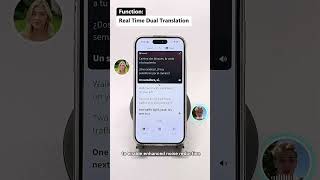
Modern iPhone translation apps use on-device speech recognition (powered by Apple’s Neural Engine) combined with cloud AI to:
- Detect the language you’re speaking automatically
- Translate speech in under one second
- Play back the translation in a natural voice — or, with apps like Owll Translator, in a cloned version of your own voice
The result is a conversation flow that feels nearly as natural as speaking your native language.
Top iPhone Real-Time Translator Apps Compared (2026)
We evaluated the leading apps on five criteria that matter most for live conversation: translation speed, voice quality, language coverage, offline support, and unique features.
| App | Real-Time Voice | Voice Cloning | Languages | Offline | Best For |
|---|---|---|---|---|---|
| Owll Translator | ✅ Instant | ✅ Yes | 100+ | Partial | Travel, Business, Family |
| Google Translate | ✅ Fast | ❌ No | 130+ | ✅ Yes | General use |
| iTranslate | ✅ Good | ❌ No | 100+ | ✅ Premium | Casual travel |
| Apple Translate | ✅ Built-in | ❌ No | 20 | ✅ Yes | Quick lookups |
| Microsoft Translator | ✅ Group mode | ❌ No | 70+ | Partial | Business meetings |
Data based on feature review as of June 2026. Language counts are approximate.
Why Owll Translator Stands Out on iPhone
Owll Translator was built from the ground up for iPhone users who need real conversation translation — not just text lookups. Here’s what makes it different:
- AI Voice Cloning: Your translated speech sounds like you. When you speak English and Owll translates to Spanish, your Spanish-speaking listener hears your voice — your tone, warmth, and personality — not a generic robot.
- Zero-Lag Performance: Translation begins before you finish your sentence, thanks to streaming speech recognition optimized for the iPhone’s Neural Engine.
- 100+ Languages: From major world languages to regional dialects like Tagalog, Catalan, and Welsh — Owll covers the conversations that matter.
- Scene-Optimized Modes: Switch between Travel Mode (casual, fast), Business Mode (formal, precise), and Medical Mode (clinical vocabulary) with one tap.
If you’re looking for the best AI voice translator for your iPhone, Owll delivers an experience that no other app on the App Store currently matches.
Best Use Cases for iPhone Real-Time Translation
🌏 Travel Abroad
Ordering food, asking for directions, or haggling at a market — Owll handles these fluid, fast-paced exchanges better than any competitor. Hold your iPhone between you and a local, and the conversation flows naturally in both directions.
💼 International Business Meetings
Client calls, negotiations, and presentations across language barriers no longer require a human interpreter. With Owll’s Business Mode and AI voice cloning, your professional presence is preserved even in translation.
👨👩👧 Multilingual Families
Grandparents who speak one language, grandchildren who speak another — Owll bridges the gap in real time, preserving the emotional connection that robotic TTS voices can destroy. For more on earbud translation options for families, see our detailed guide.
🏥 Medical Appointments
Explaining symptoms accurately to a doctor in a foreign country can be life-critical. Owll’s Medical Mode is optimized for clinical vocabulary and precise phrasing.
How to Set Up Real-Time Translation on Your iPhone
- Step 1: Download Owll Translator from the App Store (free to start)
- Step 2: Open the app and complete the 30-second voice clone setup — just read 3 short sentences
- Step 3: Select your source and target languages (or enable Auto-Detect)
- Step 4: Tap the microphone and start speaking — translation plays back instantly
- Step 5: For two-way conversation, tap the swap button and hand the phone to the other person
Frequently Asked Questions
What is the best real-time translator app for iPhone in 2026?
Owll Translator is the best real-time translator for iPhone in 2026, thanks to its AI voice cloning, zero-lag performance, and support for 100+ languages. Google Translate is a strong free alternative for general use, but it lacks voice cloning and sounds robotic in conversation.
Does iPhone have a built-in real-time translator?
Yes, iPhone includes a built-in Translate app that supports real-time conversation mode in about 20 languages. However, it does not support voice cloning or rare languages, making it less suitable for professional or international use. Third-party apps like Owll Translator offer significantly more capability.
Can I use an iPhone translator without internet?
Some iPhone translation apps offer offline mode, including Google Translate (with downloaded language packs) and iTranslate (premium). Owll Translator requires an internet connection for its AI voice cloning feature, though basic translation works with limited connectivity.
How accurate is real-time voice translation on iPhone?
Modern iPhone real-time translators achieve 90–95% accuracy for major language pairs in clear audio conditions. Accuracy drops for heavy accents, background noise, and technical vocabulary. Owll Translator’s scene-optimized modes (Travel, Business, Medical) improve accuracy by adapting vocabulary to context.
Is Owll Translator free on iPhone?
Owll Translator offers a free tier that lets you try real-time translation and voice cloning without a subscription. See the pricing plans for details on what’s included in the free and premium versions.
Start Translating in Real Time on Your iPhone
Real-time translation on iPhone has never been this natural. Owll Translator doesn’t just convert words — it preserves your voice, your tone, and your presence across any language barrier. Whether you’re traveling, working internationally, or connecting with family across languages, Owll is the iPhone translator built for real human conversation.
Leave a Reply